
The Controller:
smoother connections, less setup.
The Controller is our in-house connection tool, used only to improve the remote connection experience: lower latency and less setup time. We set up the route before delivery; install it, open it and connect to your Mac in our Toronto facility.
The Controller is optional and never required. You have full admin rights on your Mac, so you can keep connecting however you prefer.
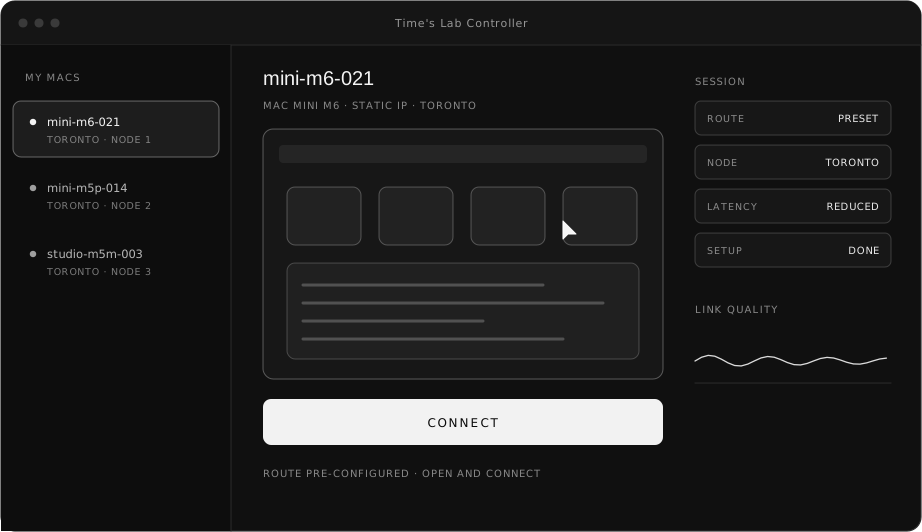
The Controller does one thing: smoother connections.
Lower latency
Connections take a route we set up in advance, with fewer detours, helping to lower latency and make remote work smoother.
Less setup time
We configure the route and connection settings before delivery, so you don't have to work out ports, VPN or other connection settings yourself.
Open and connect
Install the Controller, open it, pick your Mac and connect.
Actual latency depends on your region and local network.
Three steps to your Mac.
- STEP 01
Pick a machine and sign
Configure on the Machines & Pricing page, or contact us directly.
- STEP 02
We set up the route and deliver
If you'd like to use the Controller, the installer and sign-in details come with delivery.
[ Supported client systems, e.g. macOS / Windows, to be confirmed ]
- STEP 03
Open the Controller and connect
Pick your Mac and start working.
Enterprise management, arranged separately.
The Controller itself is only for faster connections. If your team has access-management needs, contact us to discuss them separately; what's included is set by the custom plan both sides agree on. Areas we can discuss include:
Need an enterprise setup?
Tell us your team size and management requirements; we'll assess them and propose a plan.